

In this guide
A guest opens a message from the hotel asking them to settle their bill. Before entering card details, they want to recognise the hotel, understand the amount and check the charges. The payment page needs to answer those questions in the order they arise.
A useful hotel payment page shows the booking, the purpose of payment, the amount and currency, and a clear route to secure checkout. It should also explain how the guest will receive confirmation and where to ask about an incorrect charge. The hotel team needs the payment result recorded against the right booking.
Start with the reason for the payment
A deposit, a balance before arrival and an outstanding bill at departure are different tasks. Name the task at the top of the page. “Your stay deposit” tells the guest more than “Payment request”.
Include enough booking information to make the request recognisable. Stay dates and a booking reference may be sufficient. Avoid displaying unnecessary personal information, particularly on pages reached through a link.
Explain how the amount relates to the booking. For a deposit, say what it secures and make the applicable terms available. For checkout, show what has already been paid and what remains outstanding.
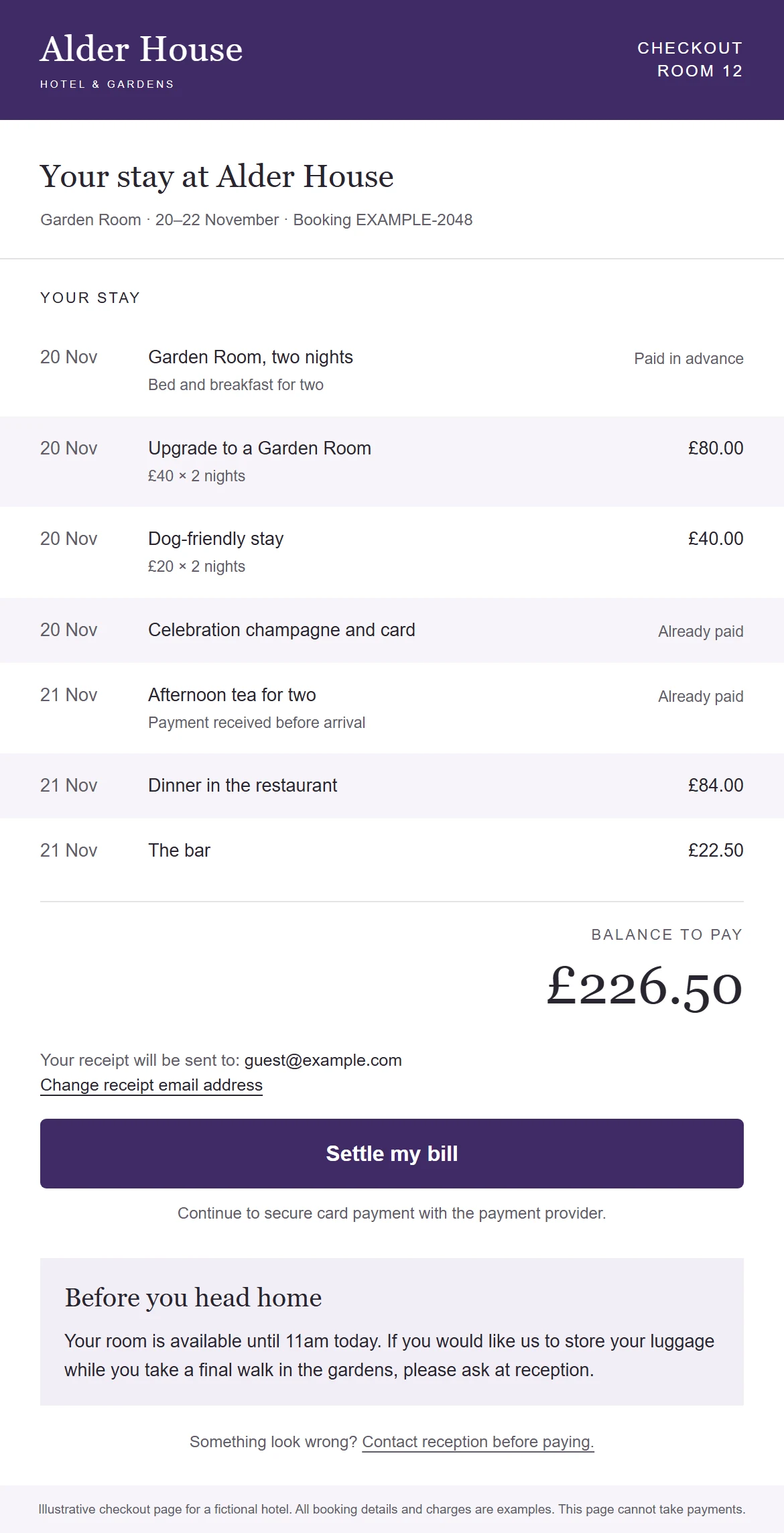
Give guests an itemised bill when they need one
An itemised departure page helps guests check unfamiliar amounts before paying. Room charges, upgrades, dining and other extras should have descriptions that make sense outside the hotel's accounting system.
Use dates where they help identify a charge. Distinguish amounts already paid from those included in the balance. If a guest prepaid for afternoon tea, that line should not look as though it is being charged again.
| Page element | Question it answers |
|---|---|
| Booking and stay dates | Is this my stay? |
| Charge descriptions | What am I paying for? |
| Previous payments | Has my deposit been counted? |
| Amount and currency | What will be taken now? |
| Contact route | Who can help if this looks wrong? |
Check the underlying bill before designing the page. A booking can have more than one guest bill, several rooms or charges belonging to different payers. The hotel must decide which balances the guest should see and pay. A polished screen cannot resolve an incomplete bill selection.
Carry the hotel's identity through checkout
Use the hotel's logo, colours and tone of voice. Keep the name visible around the payment action so the guest can recognise who is requesting the money.
A recognisable domain can help maintain continuity. Availability depends on the payment provider and setup. If the guest moves onto a provider's domain, explain the transition and use the branding options that provider supports. Hosted payment products can offer custom branding and domains, although the available controls vary. Stripe's hosted-checkout overview illustrates these options.
Treat the layout as part of the guest experience. Give the balance and payment button enough space. Use readable labels and test the page on a phone, including larger text settings. Decorative content should leave the guest's task easy to follow.
Keep card entry with the payment provider
Link the guest to the provider's secure checkout or use the provider's supported embedded interface. Avoid asking the guest to type card details into a chat thread or a general hotel enquiry form.
Show what happens next. “Continue to secure checkout” is suitable when another step follows. “Pay £226.50” can be appropriate where the next action actually authorises that amount. Match the wording to the behaviour.
The hotel should also agree how failed payments, abandoned attempts and expired links are handled. Give the guest a useful route back to reception without inviting them to share card details in the message.
Confirm payment from a reliable result
A guest reaching a success screen is useful feedback, but the hotel needs confirmation from the payment system. Guests may close their browser or lose their connection after completing a payment.
The system should handle payment notifications once, even if the provider sends the same event again. Record the payment reference, amount and booking association. Then update the relevant hotel process and stop further reminders for the settled balance.
Payment providers document how their completion events should be handled. Follow the chosen provider's integration guidance rather than using a page visit as proof of payment. Stripe's confirmation guidance explains why a landing-page redirect alone is unreliable.
A reception test before the page goes live
Ask a colleague to act as the guest while another checks the booking record. Use a test booking and the provider's test environment where available.
- Change a charge after the payment link has been created. Confirm the guest sees the current amount or a clear explanation that the request has been replaced.
- Settle part of the bill another way. Check that the remaining balance changes before another payment is requested.
- Use a booking with two rooms or separate payers. Confirm whose charges appear on the page.
- Send the same payment notification twice. Confirm the booking receives one payment record and the guest receives one confirmation.
A useful pass condition is that the guest page, payment result and hotel record agree. Keep a named owner for any mismatch before releasing the journey to guests.
Make the receipt useful
Confirm the amount received and the booking it relates to. Where the guest can choose a receipt email address, explain that choice clearly and validate the address before sending.
A payment receipt does not establish marketing consent. Keep the communication focused on the transaction and apply a separate permission process to future promotional messages.
Before releasing a payment page, run through a successful payment, a declined attempt, a repeated notification, an expired link and an incorrect charge query. Ask reception to confirm what they can see after each outcome.
Biteluxe shapes hotel payment journeys around the hotel's existing processes and provider. Bring us the point where guests hesitate or the team has to chase a payment manually. We can work through the page, the message and the record the hotel needs afterwards.